Running a small business often means doing several jobs at once.
How AI Automation Can Save Small Businesses Hours Every Week
You might be answering customer messages in the morning, following up with leads in the afternoon, updating your CRM, sending invoices, preparing reports and dealing with administrative tasks before the day ends. The problem isn’t always that there isn’t enough time.
Sometimes, too much of that time is being spent doing tasks that don’t actually require a human to do them manually.
This is where AI automation can make a significant difference. AI automation combines artificial intelligence with automated workflows to handle repetitive tasks, process information and trigger actions based on predefined conditions.
For small businesses, the goal isn’t to replace people. It’s to remove unnecessary manual work so people can focus on higher value activities.
Below are some practical ways AI automation can save your business hours every week.
1. Automatically Capture and Organize Leads
Imagine someone submits a form on your website. Without automation, someone may need to:
- Check the form submission.
- Copy the customer’s information.
- Add the lead to a CRM.
- Categorize the lead.
- Send an initial response.
- Notify the sales team.
An automated workflow can handle much of this process. For example:
Website Form → AI → CRM → Lead Classification → Email → Team Notification
AI can analyze the information submitted and help determine whether the lead is a sales inquiry, support request, partnership opportunity or something else. Instead of manually organizing every inquiry, your team receives structured information ready for action.
2. Automate Customer Follow-Ups
Following up with potential customers is important, but it’s also easy to forget.
A lead might contact your business today and never hear from you again.
An automated workflow can trigger follow-ups based on what happens next.
For example:
New Lead → Immediate Email → Wait 2 Days → Follow-Up → Wait 3 Days → Final Follow-Up
AI can also help personalize messages based on the information available about the lead.
This allows your business to maintain consistent communication without someone manually remembering every follow up.
3. Turn Customer Messages Into Actionable Tasks
Businesses receive messages through websites, email, social media and other channels. Not every message requires the same response.
AI can help classify incoming messages.
For example:
- Customer Message
- ↓
- AI analyzes message
- ↓
- Sales / Support / Billing / General Inquiry
- ↓
- Automatically route to the correct workflow
A sales inquiry could go to your sales CRM.
A support issue could create a support ticket.
A billing question could be sent to the appropriate team.
This reduces the amount of time employees spend manually sorting messages.
4. Automate Appointment Scheduling
Appointment management can create a surprising amount of administrative work.
Someone may need to:
- Respond to booking requests
- Check availability
- Confirm appointments
- Send reminders
- Reschedule customers
- Follow up after appointments
Automation can connect your website, calendar, CRM and communication tools.
For example:
Booking → Calendar → Confirmation Email → Reminder → CRM Update
You can also create follow up workflows after the appointment.
For example:
Appointment Completed → Thank You Email → Feedback Request → CRM Update
5. Automatically Process Documents and Information
Small businesses often receive information in emails, forms, PDFs and documents. Manually reading and transferring that information into another system can take considerable time.
AI can help extract useful information from documents and convert unstructured information into structured data.
For example:
Document → AI Extraction → Structured Data → Spreadsheet/CRM
Depending on the workflow, AI can identify things such as:
- Names
- Email addresses
- Company information
- Order numbers
- Dates
- Product information
- Customer requests
The extracted information can then be passed into another automated workflow.
6. Automate Customer Support
AI automation can also help businesses handle common customer questions. Instead of having employees repeatedly answer the same questions, an AI-powered system can handle routine requests and escalate more complicated issues to a human.
For example: Customer Question → AI → Answer Available?
Yes → Respond Automatically
No → Create Support Request → Notify Team
This creates a better balance between automation and human support. The objective isn’t necessarily to automate every conversation. It’s to automate the repetitive conversations while allowing your team to focus on situations that require judgment.
7. Automate Reports and Business Updates
Reporting is another task that often consumes time.
A business owner might need to collect information from several systems before creating a weekly report.
For example:
- Website analytics
- CRM data
- Sales
- Advertising
- eCommerce orders
- Customer inquiries
Instead of manually collecting the information, automation can gather it from connected systems. AI can then summarize the information into a readable report.
For example:
Weekly sales increased compared with the previous period, while website leads remained stable. Most new inquiries came from the contact form.
The workflow can then automatically send the report to the business owner or management team.
Automate Ecommerce Operations
Online stores can have dozens of repetitive processes happening every day.
Examples include:
- New order notifications
- Customer emails
- Inventory updates
- Order status updates
- Review requests
- Abandoned-cart follow-ups
- Shipping notifications
- Customer segmentation
A typical automated workflow could look like:
New Order → Update CRM → Notify Team → Customer Confirmation → Fulfillment Workflow
Another could be:
Order Delivered → Wait 5 Days → Review Request
This can reduce repetitive administrative work while keeping customers informed.
9. Use AI to Summarize Information
Business owners and employees often spend time reading long emails, customer conversations, meeting notes and reports.
AI can summarize this information automatically.
For example:
Customer Conversation → AI Summary → CRM
Instead of reading an entire conversation before contacting a customer, the employee could see a short summary containing:
- What the customer needs
- What has already been discussed
- Current status
- Recommended next action
This becomes particularly useful when multiple employees interact with the same customer.
10. Automate Internal Team Notifications
Not every automation needs to face the customer.
Internal processes can also be automated.
For example:
New High-Value Lead → AI Identifies Lead → Slack/Email Notification → Create Sales Task
Or:
Failed Payment → System Detects Failure → Customer Notification → Team Alert → Follow-Up Task
These small automations can prevent important information from being missed.
AI Automation Isn't Just About Chatbots
When people hear “AI automation,” they often think about chatbots.
Chatbots are only one part of the bigger picture.
AI automation can involve:
- Data processing
- Lead qualification
- Document extraction
- Email classification
- Customer support
- Content processing
- CRM management
- Reporting
- E-commerce workflows
- Internal operations
- Business intelligence
The real opportunity comes from connecting AI to the systems your business already uses.
AI + Automation: Why They Work Better Together
Traditional automation is excellent when the rules are predictable.
For example:
If a customer submits a form → send an email.
But AI becomes useful when information isn’t perfectly structured.
For example:
Read this customer message and determine what they need.
That information can then trigger an automated workflow.
This creates a more intelligent process:
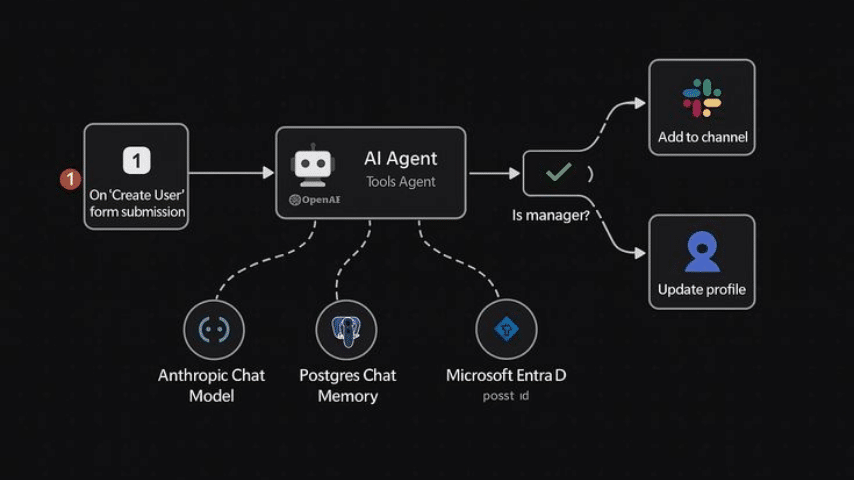
Input → AI Understands → Automation Decides → System Takes Action
This combination can make workflows considerably more flexible.
Tools You Can Use for AI Automation
Several platforms can be used to build automated business workflows.
N8N
Useful for businesses that need flexible and highly customizable workflows, integrations and AI-powered processes.
Make
A visual automation platform that can connect different applications and build sophisticated workflows without traditional programming.
Zapier
Popular for connecting business applications and creating straightforward automated workflows.
AI Platforms
AI services can be connected to these automation platforms to perform tasks such as classification, summarization, extraction and content processing.
The best tool depends on the complexity of your workflow, the applications you already use and how much control you need.
What Should Your Business Automate First?
Don’t start by trying to automate everything.
Start with tasks that are:
Repetitive + Time-consuming + Rule-based + Low-value
For example, if your team spends 30 minutes every day copying lead information between systems, that’s an obvious automation opportunity.
If a task takes 5 minutes once a month, automating it probably isn’t a priority.
A simple way to identify opportunities is to ask:
What does my team repeatedly do that a system could do for us?
Write down those tasks.
Then estimate how much time each one consumes every week.
You’ll quickly start seeing where automation could have the biggest impact.
The Best Automation Doesn't Replace Your Team
Good automation should make your team more productive, not make your business less human.
Your employees should spend less time:
- Copying data
- Searching for information
- Sending repetitive emails
- Updating multiple systems
- Creating routine reports
- Sorting requests
And more time:
- Talking to customers
- Closing deals
- Solving complex problems
- Improving products
- Creating strategies
- Growing the business
That’s where automation creates real value.
Start Small and Build From There
You don’t need a massive AI system to benefit from automation.
Start with one workflow.
For example:
Website Lead → CRM → AI Qualification → Follow-Up Email → Sales Notification
Once that works reliably, build the next workflow.
Over time, these individual workflows can become a connected business system that operates in the background.
The goal isn’t to automate for the sake of automation.
The goal is to create a business that spends less time on repetitive work and more time creating value.
Need Help Automating Your Business?
At GreatCorp, we help businesses design and implement practical digital workflows that connect websites, CRMs, eCommerce platforms, AI tools and business applications.
Whether you need a simple lead-follow-up workflow or a more advanced AI-powered business system, the first step is identifying where your current process is wasting time.
Ready to reduce repetitive work?
[Talk to Us at GreatCorp about your automation project →]
Our work
Selected work. Built for real business and clients
Learn more