10 Business Tasks You Should Automate in 2026
Every business has repetitive work. A potential customer submits a form. Someone copies their information into a CRM. An order arrives. Someone updates a spreadsheet. A client books an appointment. Someone sends a confirmation. An invoice becomes overdue. Someone remembers to follow up.A new enquiry arrives. Someone forwards it to the appropriate person. Individually, these tasks may take only a few minutes. Repeated dozens or hundreds of times, however, they consume hours that could be spent on sales, customer relationships, strategy or actual service delivery.
That’s where business automation becomes valuable. Automation doesn’t necessarily mean replacing employees with artificial intelligence or building an enormous technical system. Sometimes it simply means:
When X happens, automatically do Y.
Modern automation platforms can connect websites, CRMs, email platforms, spreadsheets, payment systems, eCommerce stores, databases and AI services into workflows that move information automatically.
Here are ten areas businesses should consider automating in 2026.
1. Lead Capture and CRM Entry
Imagine a potential customer completes the contact form on your website.
Without automation, the process might look like:
Form submitted → email received → employee opens email → copies name → copies phone number → copies email → opens CRM → creates contact → adds notes → assigns salesperson.
There’s nothing particularly difficult about this. That’s precisely why it shouldn’t necessarily require repeated manual work.
An automated workflow could instead be:
- Website Form↓
- Validate Information↓
- Create/Update CRM Contact↓
- Tag Lead Source↓
- Assign Salesperson↓
- Send Notification↓
- Begin Follow-Up
The potential customer gets into your sales system almost immediately. Automation can also preserve useful information such as:
- page submitted from
- requested service
- campaign source
- UTM parameters
- location
- date/time
- assigned salesperson
That creates cleaner data and reduces manual entry.
2. Lead Follow Up
Generating a lead isn’t particularly valuable if nobody follows up.
Businesses lose opportunities simply because enquiries are forgotten, buried in inboxes or contacted too late.
A basic automated follow-up might work like this:
New lead enters CRM
↓
Immediate acknowledgement email
↓
Salesperson receives notification
↓
Follow-up task created
↓
No response after 2 days? Send reminder
↓
Still no response? Create another follow-up task
This doesn’t mean bombarding someone with twenty automated emails. Good automation should support the sales process, not annoy potential customers.
The objective is consistency. Every legitimate lead should receive the appropriate response instead of depending entirely on somebody remembering.
3. Appointment Booking and Reminders
Businesses that rely on appointments can automate much of the administration surrounding bookings. That includes:
- Booking confirmation
- Calendar event creation
- Reminder emails
- SMS reminders
- Rescheduling information
- Internal team notifications
- Post-appointment follow-up
Consider a photography booking. A potential client selects a studio session. Automation could:
Create booking → add calendar event → create CRM contact → send confirmation → send preparation instructions → remind client 24 hours before session → notify photographer → send follow-up afterward.
The same model applies to:
- consultants
- salons
- agencies
- clinics
- coaches
- photographers
- service businesses
The appointment itself still requires a person. The repetitive administration around it doesn’t always have to.
4. Customer Onboarding
A customer has just paid. What happens next? For many businesses, this triggers several manual tasks:
Send welcome email.
Request project information.
Create client folder.
Create project-management task.
Notify team.
Generate invoice.
Schedule kickoff.
Add client to CRM.
Automation can connect these steps.
For example:
- Payment Received
- ↓
- Update CRM to “Client”
- ↓
- Send Welcome Email
- ↓
- Send Onboarding Form
- ↓
- Create Project
- ↓
- Create Client Folder
- ↓
- Notify Team
- ↓
- Create Kickoff Task
The client receives a consistent onboarding experience while your team avoids repeating the same administrative setup for every new project.
5. Invoices and Payment Follow Ups
Chasing payments manually isn’t a particularly productive use of time. Many invoicing and payment platforms can automate parts of the process.
A workflow might detect:
Invoice due in 3 days
→ send friendly reminder.
Invoice reaches due date
→ send payment reminder.
Invoice becomes overdue
→ notify client and internal account manager.
Payment received
→ update CRM, mark invoice as paid and send receipt.
Payment automation can also trigger other business processes.
For example:
Deposit received → project automatically moves from “Pending” to “Ready to Start.”
That removes another manual handoff.
6. Ecommerce Order Workflows
Online stores already automate many activities by default, but additional integrations can take the system considerably further. Suppose someone places an order on Shopify or WooCommerce.
Depending on the business, automation could:
Record order
↓
Update external inventory
↓
Notify fulfilment
↓
Update CRM
↓
Send order data to accounting
↓
Tag customer
↓
Trigger post-purchase communication
↓
Request review after delivery
Automation can also handle exceptions.
For example:
High-value order received → notify account manager.
or:
Inventory drops below 10 units → send stock alert.
or:
Customer makes third purchase → add VIP tag.
These workflows become particularly valuable as order volume grows.
7. Customer Support Routing
Not every support enquiry should go to the same person. Automation can help categorize and route requests based on:
- department
- customer type
- subject
- urgency
- product
- keywords
- order status
Imagine a support form where a customer selects:
Billing
Technical Support
Returns
Sales
Instead of every submission entering one general inbox, automation can send each request to the correct workflow. AI can potentially assist with classification as well.
For example:
Customer message received
↓
AI classifies intent
↓
Create support ticket
↓
Assign correct department
↓
Set priority
↓
Send acknowledgement
The important distinction is that AI doesn’t necessarily need to answer the customer. It can simply help organize the work for a human team.
8. Review and Feedback Requests
Satisfied customers are often willing to leave reviews. The problem is that businesses frequently forget to ask. Automation can trigger review requests after an appropriate event.
For example:
Order delivered
↓
Wait 5 days
↓
Send review request
or:
Project marked completed
↓
Send thank-you message
↓
Request feedback
↓
If positive → provide review link. The timing should make sense for the business.
A photographer might request feedback after delivering the final gallery. An ecommerce company might wait until the customer has had time to receive and use the product. A web development company might request feedback after launch. Automation ensures the request actually happens.
9. Reporting and Data Collection
How much time does your team spend copying numbers from one platform into another? Businesses often have information scattered across:
Google Analytics
Google Ads
Meta
Shopify
Stripe
CRMs
Spreadsheets
Email marketing platforms
project-management systems
Instead of manually assembling reports every Monday, workflows can collect relevant information automatically.
For example:
Every Monday at 8 AM
↓
Pull previous week’s sales
↓
Pull lead count
↓
Pull advertising spend
↓
Calculate key metrics
↓
Update dashboard
↓
Send summary to management. This doesn’t eliminate analysis. It eliminates much of the repetitive work required to prepare the information for analysis.
10. Internal Notifications and Task Management
One of the simplest automation opportunities is also one of the most useful.
Notify the right person when something important happens.
Examples:
New qualified lead → notify sales.
Large Shopify order → notify fulfilment.
Payment failed → notify accounts.
Client submits onboarding form → notify project manager.
Website form reports technical problem → notify developer.
Contract signed → create project task.
Customer requests cancellation → alert support.
Without automation, employees often spend time checking systems to determine whether something happened.
With event driven automation, the system can tell them when attention is required.
What Tools Can Businesses Use for Automation?
You don’t necessarily need custom software. Several platforms can connect existing applications.
ZAPIER is commonly used to create relatively straightforward connections between business applications. A typical workflow might be:
Form Submission → Create CRM Contact → Send Email
It can be useful when businesses want to automate common workflows quickly.
MAKE provides a highly visual workflow-building environment and supports more complex branching and data manipulation. A workflow might involve several applications and conditional paths.
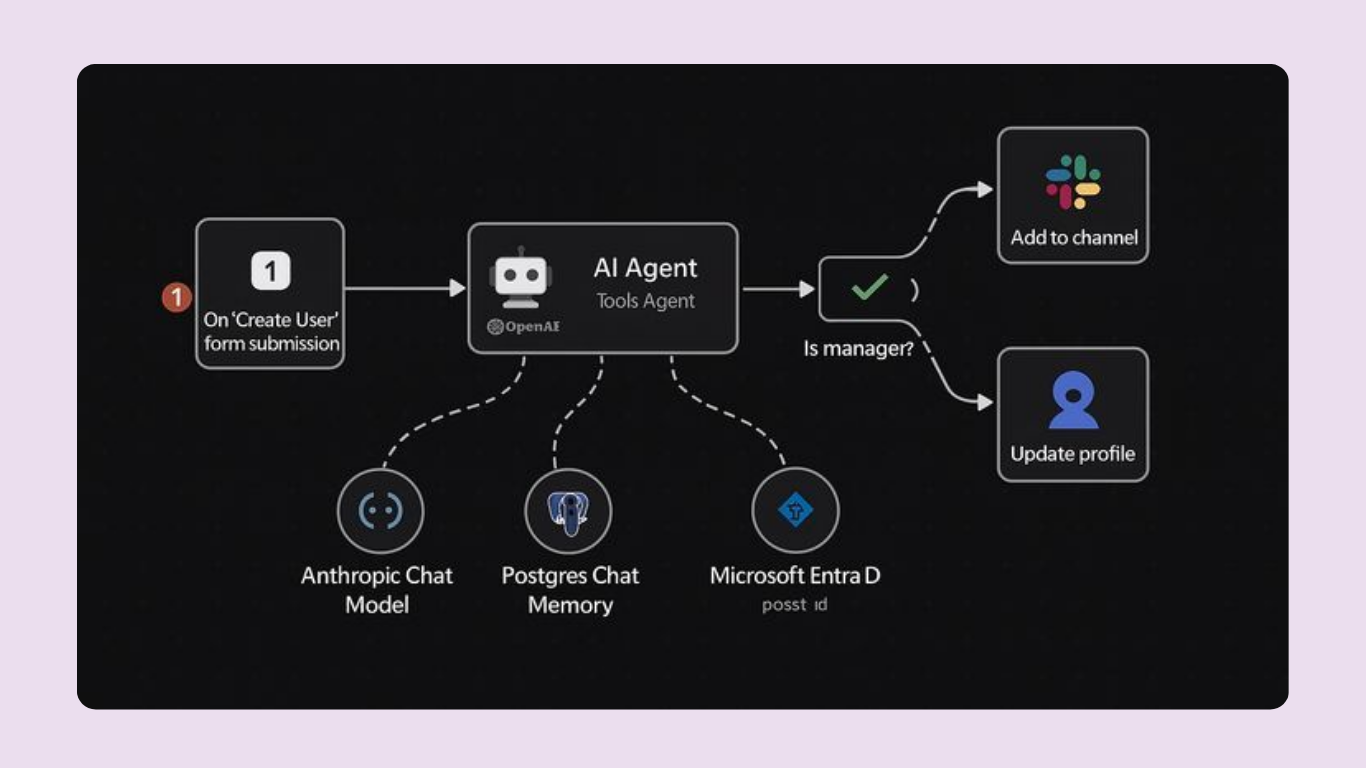
N8N provides significant flexibility for more technical or customized automation workflows. It can be particularly useful where businesses need greater control over APIs, data processing, branching logic or infrastructure.
The best tool depends on the workflow. A business shouldn’t choose an automation platform first and then look for problems to solve with it.
Start with the problem. Then choose the technology.
What Should You Automate First?
If you’re just starting, consider this order:
Lead capture
Make sure opportunities aren’t being lost.
↓
Lead follow-up
Make response processes consistent.
↓
Customer onboarding
Reduce repetitive administration.
↓
Internal notifications
Keep teams informed automatically.
↓
Reporting
Reduce repetitive data collection.
↓
Customer retention
Automate appropriate review, re-engagement and post-purchase workflows.
Then expand based on actual business bottlenecks.
Build a Business That Doesn't Depend on Repetitive Manual Work
Automation should make your business easier to operate.
It should reduce unnecessary data entry, improve consistency and help information move between the systems you already use.
At Greatcorp, we design business automation and integration workflows connecting websites, CRMs, eCommerce platforms, databases, payment systems and communication tools.
Depending on the project, that can involve platforms such as n8n, Make, Zapier, GohighLevel, Hubspot, Shopify, WordPress, Woocommerce, Supabase, Stripe and AI integrations.
The objective isn’t automation for its own sake.
It’s building a system where technology handles repetitive work while people focus on work that actually requires them.
Still doing repetitive business tasks manually?
Our work
Selected work. Built for real business and clients
Learn more